Monday, 19 October 2015
Monday, 12 October 2015
Start Angular JS (Angular JS Install)
Grand Prix drivers example
http://www.toptal.com/angular-js/a-step-by-step-guide-to-your-first-angularjs-app
C:\phonegap_apps\angular-seed
angular-seed install and run
https://github.com/angular/angular-seed
A simple example => not working, but read some.
http://www.sitepoint.com/getting-started-mobile-angular-ui/
Source code
https://github.com/sitepoint-editors/MobileAngularUIApp_Part_1
C:\phonegap_apps\MobileAngularUIApp_Part_1-master
Another nice example
http://coenraets.org/blog/2013/11/sample-mobile-application-with-angularjs/
Editing AngularJS in visual studio
http://blogs.msdn.com/b/visualstudio/archive/2015/02/05/using-angularjs-in-visual-studio-2013.aspx
Mobile Angular UI
https://github.com/mcasimir/mobile-angular-ui
Mobile Angular UI - Getting started (install)
http://mobileangularui.com/docs/getting-started/
<USEFUL LINKS>
Angular JS, Hello World (Very nice series)
http://viralpatel.net/blogs/angularjs-introduction-hello-world-tutorial/
scope / controller
http://viralpatel.net/blogs/angularjs-controller-tutorial/
ng-view
Angular JS 5 examples
http://tutorialzine.com/2013/08/learn-angularjs-5-examples/
http://jimhoskins.com/2012/12/17/angularjs-and-apply.html
factory
http://blog.manishchhabra.com/2013/09/angularjs-service-vs-factory-with-example/
scope value watch
http://www.bennadel.com/blog/2852-understanding-how-to-use-scope-watch-with-controller-as-in-angularjs.htm
scope function watch
http://www.bennadel.com/blog/2658-using-scope-watch-to-watch-functions-in-angularjs.htm
Phonegap with AngularUI
Your first Phonegap App with Mobile Angular Ui
http://mobileangularui.com/blog/using-the-generator/https://github.com/mcasimir/generator-mobileangularui
The Git Example had some errors.
https://github.com/mcasimir/generator-mobileangularui/issues/21
I followed below but stopped because of too much time waste.
Install nvm
http://stackoverflow.com/questions/25654234/node-version-manager
Install nvmw
https://github.com/hakobera/nvmw
Restart cmd to recognize nvmw path.
Although it looks like an error, it seems good.
Tuesday, 6 October 2015
Phonegap iOS Cross Domain issue
Webservice using external domain didn't work phonegap ios (phonegap android was fine)
People say...
Phonegap should support cross domain:
phonegap ios ajax not working
Moving to xhr => No
http://stackoverflow.com/questions/9379220/calling-web-service-using-phonegapios
The below site saved my life!! NSAppTransportSecurity
Ajax Not working in IOS 9.0 Cordova
http://stackoverflow.com/questions/32706656/ajax-not-working-in-ios-9-0-cordova
Another nice URL:
http://enable-cors.org/server.html
Wednesday, 23 September 2015
How to deploy phonegap to android device
When deploying phonegap project to device, my old android device was not recognized (Nexus S, Android os 4.1.2)
I checked Developer Option >> Enable USB Debug, but still adb returned no device.

I get to know that I have to install Google USB Driver to catch my phone.
Then my phone showed up.
Now when I run the following, it doesn't go to emulator any more but goes directly to the phone! It's because my phone is connected with USB cable.
C:\Users\matthew.oh\Dropbox\my-app\hello\platforms\android>phonegap run android
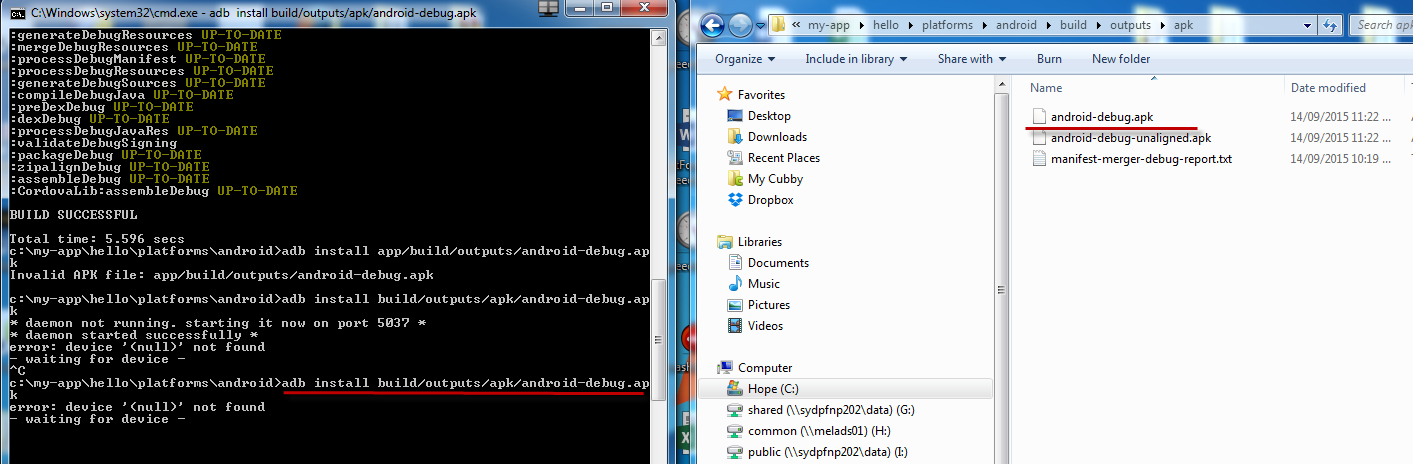
C:\Users\matthew.oh\Dropbox\my-app\hello\platforms\android>adb install build/outputs/apk/android-debug.apk
Voila!
The message.html shows nothing because it didn't have WebAPI codes in there yet.
<The below is needed when your dubugging WepAPI URL is different from Live url>
You have to both update WebAPI and phonegap's message.html to deploy properly in my case. This is because my WepAPI URL had cross domain issue.
Make sure that message.html points to the correct URL.
Change WebAPI project to use a correct url and test it compile correctly.
Publish WebAPI project and copy across to live Web API url. You may need to copy across through FTP only the files you changed.
Now, WebAPI is ready to use.
Check if the live url works fine.
Run phone gap again. You don't need to compile again. It seems it builds first and deploy to device.
Voila again!
Friday, 18 September 2015
How to compile Phonegap
<Windows>
Move c:\my-app folder into C:\Users\matthew.oh\Dropbox to work everywhere.
1. Open Visual Studio
2. Open Web site
3. Select folder, C:\Users\matthew.oh\Dropbox\my-app
Now you can edit html and js etc.
4. To compile app, open cmd
5. Move to the app folder
6. Type in
phonegap build android
or
phonegap run android
7. After a while (takes sometime to build in first time), you will see below.
8. When you compile in dos cmd, there is no way to scale (You can scale in android SDK, but this hello example you created as phone gap app in cmd. Android SDK, I could import phone gap app, but I could not edit/compile in the SDK)
9. Alt + Space to move the emulator
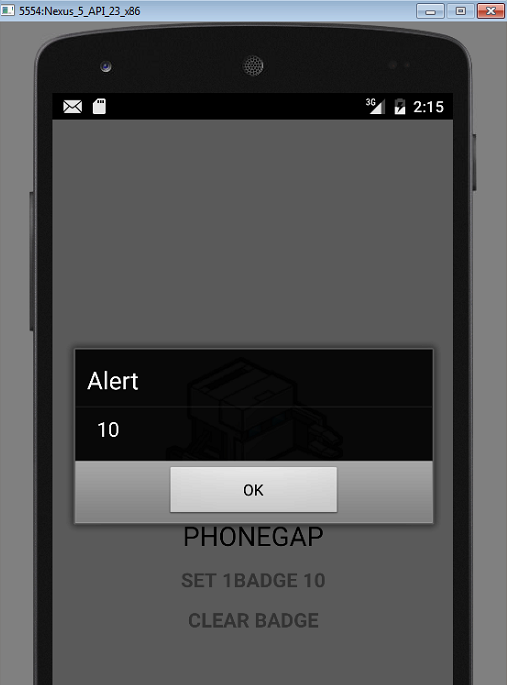
10. Because you installed the badge plugin, you can run it.
<Mac>
1. Install dropbox (go to dropbox home page, download)
2. Open terminal
3. Mac + Space, type in terminal
4. /Users/administrator/Dropbox/my-app/hello
5. phonegap run iOS
5. phonegap build ios
2. Open xcode
3. Open Dropbox >> my-app >> hello >> platforms >> iOS >> HelloWorld.xcodeproj
4. Run
5. iOS Simulator pops up
6. To deply, select your iPhone, and run
7. Enjoy your app in iPhone
Move c:\my-app folder into C:\Users\matthew.oh\Dropbox to work everywhere.
1. Open Visual Studio
2. Open Web site
3. Select folder, C:\Users\matthew.oh\Dropbox\my-app
Now you can edit html and js etc.
4. To compile app, open cmd
5. Move to the app folder
6. Type in
phonegap build android
or
phonegap run android
7. After a while (takes sometime to build in first time), you will see below.
8. When you compile in dos cmd, there is no way to scale (You can scale in android SDK, but this hello example you created as phone gap app in cmd. Android SDK, I could import phone gap app, but I could not edit/compile in the SDK)
9. Alt + Space to move the emulator
10. Because you installed the badge plugin, you can run it.
<Mac>
1. Install dropbox (go to dropbox home page, download)
2. Open terminal
3. Mac + Space, type in terminal
4. /Users/administrator/Dropbox/my-app/hello
5. phonegap build ios
2. Open xcode
3. Open Dropbox >> my-app >> hello >> platforms >> iOS >> HelloWorld.xcodeproj
4. Run
5. iOS Simulator pops up
6. To deply, select your iPhone, and run
Sunday, 13 September 2015
Phonegap install again 2015 09 14
Phonegap install again.
Install
1. install java
I had to add %JAVA_HOME%\bin into path.
2. install android sdk
3. I had to change BIOS (f10 for HP machine) to enable hardware virtualization. And then I had to install the exe file (google it).
Cordova build
Emulator scale
Import phonegap project into Android sdk
http://www.codenutz.com/getting-started-phonegap-android-studio/
Deploy from android sdk to device
http://developer.android.com/training/basics/firstapp/running-app.html
It didn't work for me because my work PC didn't recognize my Samsung Note 4.1 Tablet
android phonegap badge icon
https://github.com/katzer/cordova-plugin-badge
http://phonegap-plugins.com/plugins/katzer/cordova-plugin-badge
Install
1. install java
I had to add %JAVA_HOME%\bin into path.
2. install android sdk
3. I had to change BIOS (f10 for HP machine) to enable hardware virtualization. And then I had to install the exe file (google it).
Cordova build
http://www.codenutz.com/getting-started-phonegap-android-studio/
Deploy from android sdk to device
http://developer.android.com/training/basics/firstapp/running-app.html
It didn't work for me because my work PC didn't recognize my Samsung Note 4.1 Tablet
https://github.com/katzer/cordova-plugin-badge
http://phonegap-plugins.com/plugins/katzer/cordova-plugin-badge
Subscribe to:
Posts (Atom)