https://www.c-sharpcorner.com/blogs/how-to-call-web-service-using-sql
Monday, 9 May 2022

Sunday, 8 May 2022
sp_OACreate sp_OAMethod
DOC i FOLLOWED
https://tidbytez.com/tag/sp_oamethod/
OLE means: Object Linking and Embedding
Below sp_configure is used to use OLE procedures
--AUTHORIZE SYSTEM STORED PROCEDURES
sp_configure 'show advanced options' ,1;
GO
RECONFIGURE;
GO
sp_configure 'Ole Automation Procedures' ,1;
GO
RECONFIGURE;
GO
--AUTHORIZED
Use OLE stored procedures as below.
	DECLARE @OLE INT
	DECLARE @FileID INT

	EXECUTE sp_OACreate 'Scripting.FileSystemObject'
		,@OLE OUT

	EXECUTE sp_OAMethod @OLE
		,'OpenTextFile'
		,@FileID OUT
		,@File
		,8
		,1
MS DOC
sp_OACreate: creates an instance of an OLE object
MS Doc shows format as below:
sp_OACreate { progid | clsid } , objecttoken OUTPUT [ , context ]
progid: identifier of OLE object to create, eg, 'Scripting.FileSystemObject'
objecttoken: is the returned object token. Must be INT type.
OUT means OUTPUT. https://www.sqlservercentral.com/forums/topic/stored-procedures-output-vs-out
https://stackoverflow.com/questions/4116912/what-are-in-and-out-parameter-in-sql-server
Tuesday, 3 May 2022
Convert TodoAPI from memory project to Local database project
The ASP.Net core API tutorial was designed as a Memory project.
Can we change this project to the local database?
This Swagger thing will be useful to test API projects.
But memory project, you have to insert test data again and again.
Error screens:


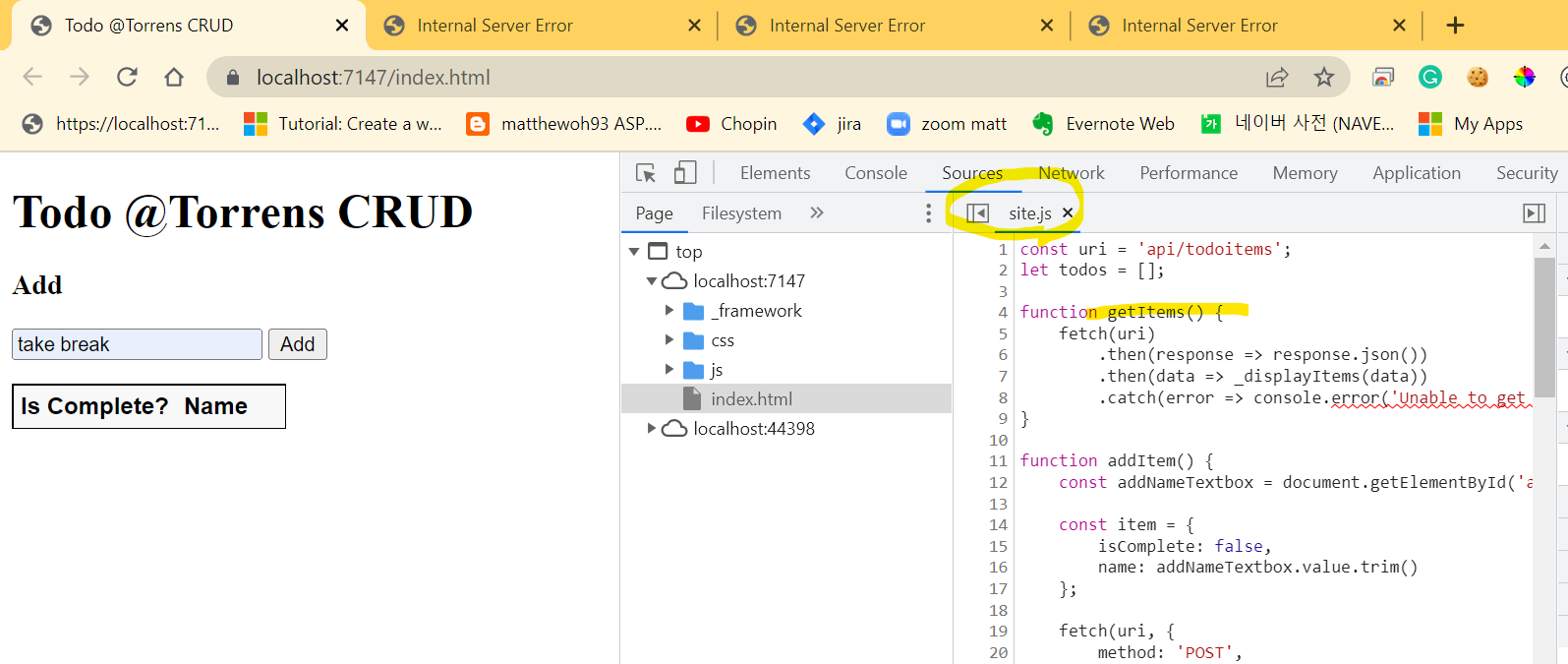
1. Program.js
//builder.Services.AddDbContext<TodoContext>(opt => opt.UseInMemoryDatabase("TodoList"));
builder.Services.AddDbContext<TodoContext>(options =>
options.UseSqlServer(builder.Configuration.GetConnectionString("MvcMovieContext") ?? throw new InvalidOperationException("Connection string 'MvcMovieContext' not found.")));
2. appsettings.json
"ConnectionStrings": {
// "MvcMovieContext": "Server=(localdb)\\mssqllocaldb;Database=MvcMovieContext-5ce78374-ee90-4f0c-b086-d99522791c01;Trusted_Connection=True;MultipleActiveResultSets=true",
"MvcMovieContext": "Data Source=xxx;Initial Catalog=xxx;User ID=xxx;Password=xxx;Integrated Security=False;"
}
}
You need to create table in the db. Note bigint. Otherwise, I had error.
CREATE TABLE [dbo].[TodoItems](
[Id] [bigint] NULL,
[Name] [nvarchar](50) NULL,
[IsComplete] [bit] NULL,
[Secret] [nvarchar](50) NULL
) ON [PRIMARY]
GO
Error screens:

Table name is TodoItems not TodoList

BigInt

Post operation still not wokring
Before that, it made error in TodoItemsController.cs#PostTodoItem()
await _context.SaveChangesAsync();
Swagger testing is working as well!


Monday, 2 May 2022
Get started with Swashbuckle and ASP.NET Core
- Swagger
- SwaggerGen
- SwaggerUI
SwaggerUI
https://localhost:7147/swagger

SwaggerEndpoint
https://localhost:7147/swagger/v1/swagger.json

Package installation
Install the package on the exiting TodoAPI project

API info and description
By changing Program.cs, you can make root url to point to Swagger.
// Configure the HTTP request pipeline.
if (app.Environment.IsDevelopment())
{
app.UseDeveloperExceptionPage();
app.UseSwagger();
//app.UseSwaggerUI();
app.UseSwaggerUI(options =>
{
options.SwaggerEndpoint("/swagger/v1/swagger.json", "v1");
options.RoutePrefix = string.Empty;
});
}
BEFORE:

AFTER:

XML Comments etc seems not working when I tried.

Tutorial: Call an ASP.NET Core web API with JavaScript
https://docs.microsoft.com/en-us/aspnet/core/tutorials/web-api-javascript?view=aspnetcore-6.0
Some quotes from the tutorial page
How to call an ASP.NET Core web API with JavaScript, using the Fetch API.
The fetch function returns a Promise object, which contains an HTTP response represented as a Response object.
A common pattern is to extract the JSON response body by invoking the json function on the Response object.
Get a list
const uri = 'api/todoitems';
let todos = [];
function getItems() {
fetch(uri)
.then(response => response.json())
.then(data => _displayItems(data))
.catch(error => console.error('Unable to get items.', error));
}
By changing launchSettings.json >> launchUrl remove, the project chagnes from API project to js html project.
Before :

After:

Add an item
fetch(uri, {
method: 'POST',
Update
fetch(`${uri}/${itemId}`, {
method: 'PUT',
Sunday, 1 May 2022
Tutorial: Create a web API with ASP.NET Core
- Create a web API with controllers - TodoContext.cs added, Scaffold controller added
- Create a minimal web API
- Web API with MongoDB
- Web API with JavaScript
- Backend for mobile
- Publish to Azure API Management
Create with controller
httprepl supports debugging.

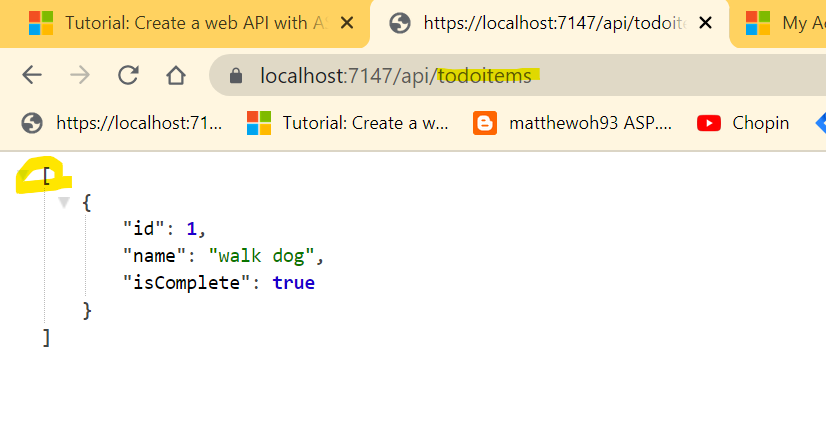
After posting an item, you can see it.
After posting another item, you can see the Location header.
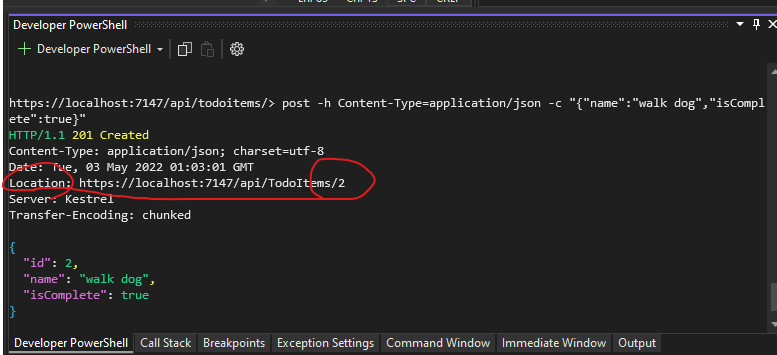
TodoItemsController.cs >> return CreatedAtAction() returns this response with Location header.
Prevent over-posting - interesting, The subset of a model is usually referred to as a Data Transfer Object (DTO), input model, or view model.
When using httprepl, make sure you connect first. Otherwise PUT operation does not work.
PUT Success - 204 no content

PUT Error - 405 method not allowed

PUT Error - 400 bad request

Before DTO (Data Transfer Object)

Before DTO (Data Transfer Object)

[HttpGet]
public async Task<ActionResult<IEnumerable<TodoItemDTO>>> GetTodoItems()
{
//return await _context.TodoItems.ToListAsync();
return await _context.TodoItems
.Select(x => ItemToDTO(x))
.ToListAsync();
}
Friday, 29 April 2022
ASP.Net model to winhost prod database
The tutorial ASP.NET Core MVC has content:
- Get started
- Add a controller
- Add a view
- Add a model - scaffold movie pages (updates/creates files)
- Work with a database
- Controller actions and views
- Add search
- Add a new field
- Add validation
- Examine Details and Delete
Add a model
Below codes create database table based on model
Add-Migration InitialCreate
Update-Database

Make sure appsetrtings.json has correct connection string to winhost to create / update table.

After running localhost, Program.cs run code block and inserts default 4 records into database.
using (var scope = app.Services.CreateScope())
{
var services = scope.ServiceProvider;
SeedData.Initialize(services);
}

Add a new field
Add-Migration Rating
Update-Database
<questions>
private readonly MvcMovieContext _context;
q. when this context is setup?
ans. Controller >> right click >> add >> New scaffolded item ...
<next>
How to deploy
https://stackify.com/how-to-deploy-asp-net-core-to-iis/
What's ASP.NET Core?
https://stackify.com/asp-net-core-features/
Local database
Use ServerName = (LocalDb)\MSSQLLocalDB
Subscribe to:
Posts (Atom)